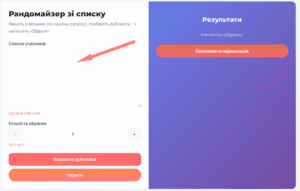
Our service allows you to quickly and easily select a contest winner. Follow these simple steps:
1. Upload the Participant List
Copy the list of participants and paste it into the designated field.
If necessary, you can remove any duplicates if the contest rules allow it.

2. Select Winners
Specify the number of winners you need and click the “Select” button.
3. Conduct the Draw
▶️ Click the “Select” button, and the service will randomly choose winners from the list.

4. Additional Features
You can copy all winners or take a screenshot of the results. Regardless of the number of winners, they will all be displayed on one screen.
Done! Your giveaway is complete.